Headers
Section titled “Headers”| Name | Type | Required | Description |
|---|---|---|---|
Api-Id | string | ✅ | Your agent identifier |
Api-Key | string | ✅ | Your secret key |
Transfer integration means API Provider holds the player’s balance. You control fund transfers by calling our API to deposit or withdraw money from the player’s API Provider account.
KRW, USD, JPY, CNY, PHP, HKD, THB, VND, BDT, INR
| Name | Type | Required | Description |
|---|---|---|---|
Api-Id | string | ✅ | Your agent identifier |
Api-Key | string | ✅ | Your secret key |
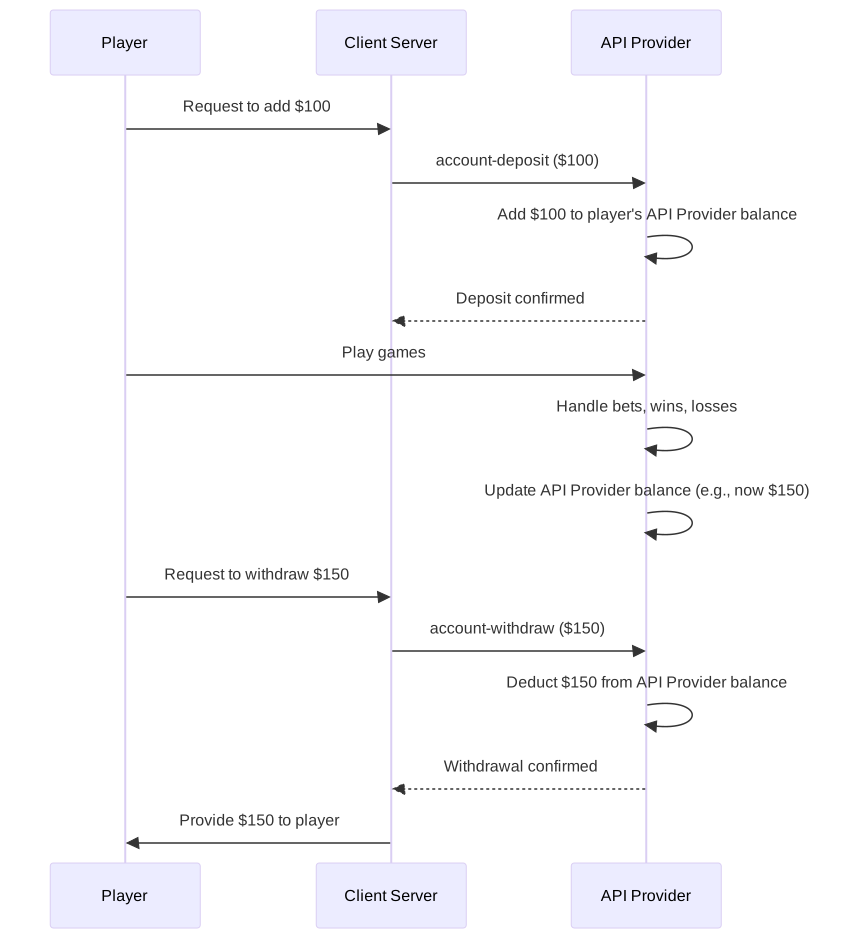
| Endpoint | Purpose | When to Use |
|---|---|---|
| Account Init | Create API Provider account | First time player accesses games |
| Account Deposit | Add funds to API Provider balance | Player wants to add money |
| Account Withdraw | Remove funds from API Provider balance | Player wants to cash out |
| Account Balance | Check player’s API Provider balance | View the current balance stored in API Provider |
| Check Transaction | Verify transaction status | Confirm pending transactions |
Refer to the error codes to handle common scenarios like insufficient balance, account not found, duplicate transactions, and invalid amounts.
Error Codes
{ "https": { "200": "successful request", "202": "failed request", "500": "internal error" }, "codes": { "0": "successful request", "1": "error occured", "2": "missing data", "3": "invalid key", "4": "data format error", "5": "expired request", "6": "invalid agent", "9": "blocked user", "100": "data value error", "101": "permission denied", "102": "insufficient balance", "103": "integration failure" }, "history_types": { "ALL": "all", "END": "ended", "ING": "ongoing" }}Your Responsibility:
API Provider’s Responsibility:
Follow this order when implementing transfer integration:
Before starting implementation, ensure you have:
Ready to start? Begin with Account Init to create your first API Provider account.